Gaming today is more than just a hobby for many; it is a vital part of unwinding after a long day at work, connecting with friends across distances, and even learning new skills. For the average US gamer around 36 years old, who balances family and career with their passion for gaming, performance matters without needing to break the bank or dive into overly technical jargon. One of the most common questions that comes up when considering an upgrade or building a new rig is how important is CPU in gaming. It is a piece of hardware often overshadowed by the GPU's flashy visuals, but its role in delivering a smooth, responsive, and enjoyable gaming experience is absolutely critical. This guide will cut through the noise, providing clear, practical insights into the CPU's true impact on your favorite titles. Whether you are looking to understand bottlenecks, planning a budget-friendly upgrade, or simply curious about optimizing your current setup, we will address the core questions you have about your processor's importance in gaming. Get ready to level up your understanding and make smarter hardware choices without the hype, focusing on real-world benefits for your busy gaming life.
Is a high-end CPU essential for all types of gaming?
Not necessarily for *all* types, but a high-end CPU becomes increasingly essential as game complexity grows. If you primarily play older titles, less demanding indie games, or games that are heavily GPU-bound at higher resolutions, a mid-range CPU might be perfectly adequate. However, for the latest AAA titles, especially open-world games, strategy games with complex AI, or any game where you are pushing high refresh rates (like 144Hz or 240Hz), a powerful CPU is crucial to prevent bottlenecks and ensure smooth, consistent performance. It also makes a huge difference if you multitask, like streaming or having multiple applications open.
How does my CPU choice impact future game compatibility?
Your CPU choice significantly impacts future game compatibility by determining how well your system can handle the increasing demands of upcoming titles. Newer games often leverage more CPU cores and threads, along with advanced instruction sets, for things like physics, AI, and complex world simulations. A modern CPU with a good core count and strong single-core performance will have a longer lifespan, allowing you to play new releases without needing an immediate upgrade. Choosing a current generation platform (e.g., LGA 1700 for Intel, AM5 for AMD) also provides a better upgrade path down the line, so you won't have to replace your motherboard and RAM as quickly when new CPUs are released.
Can a budget CPU still deliver a good gaming experience?
Absolutely, a budget CPU can deliver a surprisingly good gaming experience, especially when paired intelligently with a suitable GPU. Processors like AMD's Ryzen 5 series or Intel's Core i5 line often provide excellent performance per dollar, making them ideal for gamers who need to keep costs down. The key is to manage expectations and optimize your settings. You might not hit ultra-high frame rates in every single AAA title at maximum settings, but for many popular games, esports titles, and even recent releases with adjusted settings, a budget-friendly CPU can provide smooth and enjoyable gameplay. Focus on finding a CPU that offers strong single-core performance and at least 4-6 efficient cores, as this will cover most gaming needs without breaking the bank.
What role does CPU cache play in game performance?
CPU cache, specifically L3 cache, plays a vital but often overlooked role in game performance. Cache is ultra-fast memory built directly into the CPU chip, designed to store frequently accessed data that the CPU needs immediately. When the CPU needs data, it checks the cache first before going to the slower main RAM. A larger and faster cache means the CPU can retrieve data quicker, reducing latency and keeping the processing pipeline full. This translates to smoother frame delivery, especially in games with lots of assets or complex calculations. While not as impactful as core count or clock speed, a good cache size helps the CPU operate more efficiently, contributing to overall gaming fluidity.
Should I prioritize CPU or GPU for 1440p or 4K gaming?
For 1440p and especially 4K gaming, your GPU is almost always the primary priority. At these higher resolutions, the graphics card is doing an immense amount of pixel-pushing, becoming the main bottleneck in most systems. While a capable CPU is still important to prevent bottlenecks and ensure frame rate stability, a top-tier GPU will have a far greater impact on your raw frame rates and graphical fidelity. Think of it this way: at 4K, your CPU is still performing its game logic calculations, but the sheer workload on the GPU to render each frame is so massive that it becomes the limiting factor. Aim for a balanced system, but allocate a larger portion of your budget towards a powerful graphics card for high-resolution gaming.
Does CPU affect input lag or responsiveness in games?
Yes, your CPU can absolutely affect input lag and overall game responsiveness, though often subtly compared to network lag or monitor refresh rates. A struggling CPU can delay the processing of your mouse clicks or keyboard presses, and critically, it can slow down the entire game loop, leading to perceived input delay. When your CPU is bottlenecked, it takes longer to process game state updates and render new frames, which directly impacts how quickly your actions are reflected on screen. Ensuring you have a robust CPU helps keep the game's internal simulation running smoothly and quickly, minimizing the time between your input and the visual feedback, which is particularly important in fast-paced competitive games.
How important is CPU clock speed versus core count for gaming today?
In today's gaming landscape, both CPU clock speed and core count are important, but their priority can depend on the specific games you play and your overall usage. For pure gaming, especially in titles that aren't perfectly optimized for many cores, high clock speed (how fast each core runs) often still provides the best performance. Faster individual cores can crunch through game logic and draw calls more quickly. However, as games become more complex and leverage multi-threading better, core count (typically 6 to 8 cores for a gaming PC) is increasingly vital for smoother background tasks, streaming, and managing demanding open-world environments. The ideal is a balance: a CPU with a high clock speed and a respectable core count.
Hey fellow gamers! Ever find yourself scrolling through forums or chatting with friends, trying to figure out where to spend your hard-earned cash on PC upgrades? It is a classic dilemma: everyone talks about the graphics card, the shining star that renders those incredible visuals. But what about the unsung hero, the Central Processing Unit, or CPU? For many of us who juggle work, family, and a precious few hours for gaming each week, understanding how important is CPU in gaming can feel like trying to solve a complex puzzle. You want smooth performance, reliable frame rates, and a system that keeps up with your favorite titles, whether it is a fast-paced shooter, a sprawling open-world adventure, or a cozy co-op experience with friends. After all, 87% of US gamers regularly engage with games, often dedicating 10+ hours a week, looking for relaxation, skill-building, or just some solid fun.
We know you value performance without the unnecessary hype, and you need solutions that fit your budget and busy lifestyle. This comprehensive guide is designed to demystify the CPU's role, cut through the technical jargon, and provide clear, actionable insights. We will answer the most common questions gamers like you have, helping you understand exactly what your processor does, when it truly matters, and how to make smart upgrade decisions. No more performance bottlenecks or frustrating stuttering just smarter gaming. Let's dive in and unlock your rig's full potential.
What Exactly Does a CPU Do in Gaming?
Think of your CPU as the brain of your entire computer system, not just for gaming. While your GPU handles the visual rendering, the CPU is responsible for a massive range of critical calculations that bring a game world to life. This includes managing game logic, processing artificial intelligence for NPCs and enemies, handling complex physics calculations for environmental interactions, and coordinating all the background tasks your operating system and other applications are running. It is also the maestro that orchestrates all your hardware components, telling your GPU what to draw, fetching data from RAM, and managing input from your keyboard and mouse. Without a capable CPU, even the most powerful graphics card would sit idle, waiting for instructions, leading to choppy performance and a less immersive experience.
How Important is CPU in Gaming for Frame Rates and Stability?
When it comes to frame rates and overall game smoothness, the CPU plays a far more critical role than many gamers realize. While the GPU dictates how many frames per second (FPS) your system can render at higher resolutions and settings, the CPU determines how many frames it can feed to the GPU in the first place. This is especially true in games that rely heavily on complex simulations, large player counts in multiplayer, or detailed open worlds with many active elements. A strong CPU ensures consistent frame pacing, meaning fewer dips and stutters, which translates directly to a smoother and more responsive gaming experience. It prevents situations where your GPU is waiting on your CPU, ensuring that every component in your system is working efficiently. This stability is key for competitive games where split-second reactions matter, but it is also vital for immersive single-player experiences where consistent flow prevents breaking immersion.
When is a Powerful CPU More Crucial Than a Top-Tier GPU?
While the GPU often steals the spotlight for graphical fidelity, there are specific scenarios where a robust CPU becomes the star of the show. If you are playing games known for their CPU intensity, such as grand strategy titles like "Crusader Kings" or "Total War," massive multiplayer online games (MMOs) with hundreds of players on screen, or simulation games like "Microsoft Flight Simulator" or "Factorio," your CPU will be working overtime. These games demand extensive processing power for AI calculations, complex game states, and managing numerous entities simultaneously. Furthermore, if you are planning to stream your gameplay, record videos, or run multiple applications in the background while gaming, a powerful multi-core CPU is absolutely essential. It allows you to dedicate processing threads to these concurrent tasks without significantly impacting your in-game performance. For gamers focused on high refresh rate monitors (120Hz, 144Hz, 240Hz), a strong CPU is also paramount, as it needs to generate enough frames fast enough to fully utilize the monitor's capabilities, even if the graphical settings are lower.
Can a CPU Bottleneck My Gaming Performance?
Absolutely, yes. A CPU bottleneck is a very real and common issue where your processor is not powerful enough to keep up with your graphics card, thereby limiting the GPU's potential. Imagine having a super-fast sports car (your GPU) but driving it on a winding, narrow dirt road (your CPU). The car can go much faster, but the road limits its speed. In gaming terms, this means your GPU is waiting for the CPU to process game logic, draw calls, and other instructions, resulting in lower overall frame rates than your GPU is capable of producing. You might notice your GPU utilization is low (e.g., 60-70%) even when frame rates are not where you expect them to be. This situation often occurs when gamers prioritize a high-end GPU but neglect their CPU, or when they upgrade one component without considering the other. Understanding and preventing CPU bottlenecks is crucial for getting the most out of your entire system and ensuring a smooth, frustration-free gaming experience, especially when playing modern, demanding titles.
What Are the Key CPU Specs to Look For in Gaming?
Navigating CPU specifications can seem daunting, but for gaming, a few key metrics stand out. First, Core Count is important; while many games still favor fewer, faster cores, modern titles and multitasking benefit from 6 to 8 cores. Clock Speed (GHz) measures how many cycles per second a core can execute, and higher clock speeds generally mean better performance, especially in single-threaded tasks common in older games. IPC (Instructions Per Cycle) is also crucial, representing how much work a single core can do per clock cycle – newer architectures often have higher IPC. Cache Size helps store frequently accessed data close to the CPU, reducing latency. For gamers on a budget or those looking for value, focusing on a CPU with a good balance of high clock speeds and at least 6-8 cores from recent generations (like Intel's Core i5/i7 or AMD's Ryzen 5/7) typically offers the best bang for your buck. Always check benchmarks for specific games you play, as real-world performance can vary.
How Does CPU Impact Social Gaming and Streaming?
For the modern gamer, especially those who enjoy social aspects like playing with friends or sharing their experiences, the CPU's role extends beyond just running the game smoothly. US gamers widely embrace social gaming, with platforms like Discord being integral to the experience. A powerful CPU is vital for running voice chat applications like Discord, streaming software like OBS, and even a browser for guides or music, all simultaneously without a hitch. When you are streaming on Twitch or YouTube, your CPU is often heavily involved in encoding your gameplay video in real-time. If your CPU is struggling to handle both the game and the encoding process, you will see dropped frames in your stream, choppy footage, and a frustrating experience for both you and your viewers. This month, with more gamers than ever creating content and engaging in cross-play, a robust multi-core CPU ensures that your gaming session stays fluid while you stay connected and create. It means less lag, clearer communication, and a more professional-looking stream, making your time online more enjoyable and productive.
Is It Worth Upgrading My CPU on a Budget?
Deciding to upgrade your CPU on a budget can be a smart move, but it requires careful consideration to maximize value. First, evaluate your current setup. If you have an older CPU paired with a relatively modern GPU, a CPU upgrade can significantly reduce bottlenecks and unlock your GPU's full potential, leading to noticeable FPS gains and smoother gameplay. Look for previous-generation CPUs that offer excellent performance for their price, as these often provide significant improvements over much older chips without the premium cost of the very latest models. For example, moving from an ancient quad-core to a 6-core or 8-core chip from a few generations back can be a game-changer. However, remember that upgrading your CPU might also necessitate a new motherboard and potentially new RAM, especially if you are crossing generations or switching brands (e.g., Intel to AMD or vice-versa). Always calculate the total cost, not just the CPU price. Budget-conscious gamers should prioritize value for money, focusing on what offers the best performance boost for the games they play most, rather than chasing the absolute cutting-edge, which rarely translates to equivalent real-world value for the extra cost.
How Do I Balance CPU and GPU for Optimal Value?
Achieving a balanced CPU and GPU pairing is perhaps the most crucial aspect of building or upgrading a gaming PC for optimal value. It is about ensuring neither component is excessively powerful or underpowered compared to the other, leading to a synergistic system where both parts perform at their best. A common mistake is to spend the vast majority of your budget on a top-tier GPU while settling for a very entry-level CPU. While the GPU will deliver great visuals, the weak CPU will inevitably create a bottleneck, leaving frames on the table. Conversely, an overpowered CPU with a weak GPU means you have a powerful brain with limited graphical output. For most gamers, a good rule of thumb is to aim for a relatively even split in budget or performance tiers. For example, pairing a mid-range CPU (like an Intel Core i5 or AMD Ryzen 5) with a mid-range GPU (like an Nvidia RTX 4060 or AMD RX 7700 XT) often provides the best balance of performance and cost. Research benchmarks for the specific games and resolutions you play. Look for system builds that show high GPU utilization (ideally 95% or more) while maintaining stable frame rates. This indicates that your CPU is effectively feeding your GPU, giving you excellent performance for your investment and ensuring you get the most enjoyment out of your gaming setup.
So, there you have it. The question of how important is CPU in gaming really boils down to this: it is absolutely foundational. While your GPU paints the beautiful pictures on your screen, your CPU is the artist's brain, directing every stroke, every calculation, and ensuring that the entire masterpiece comes together smoothly and responsively. Understanding its role, recognizing bottlenecks, and making informed decisions about core count, clock speed, and balancing it with your GPU are critical steps toward a truly optimized gaming experience. For busy gamers juggling life's demands, investing wisely in your CPU means more stable frame rates, smoother multitasking for streaming or social play, and a system that feels fluid and fun. Don't let an underpowered processor hold back your precious gaming time.
What's your biggest gaming challenge when it comes to hardware? Are you experiencing bottlenecks, or planning an upgrade? Share your thoughts and questions in the comments below! Let's help each other build the best gaming rigs for our lives.
Can an old CPU limit a new GPU?
Yes, absolutely. An older, less powerful CPU can create a significant bottleneck, preventing a newer, high-end GPU from reaching its full potential. The CPU won't be able to feed frames fast enough, leading to lower FPS and inconsistent performance.
How many CPU cores are best for gaming in 2026?
For most modern gaming in 2026, 6 to 8 cores (like a Ryzen 5/7 or Core i5/i7) offer the best balance of performance, multitasking capability, and value. More cores are beneficial for streaming or professional tasks, but not strictly necessary for gaming alone.
Does CPU affect game loading times?
While an SSD is the primary factor for fast loading times, a capable CPU also contributes. It processes the game data being loaded from storage into memory, so a faster CPU can slightly improve overall loading performance, especially in complex, open-world games.
Is overclocking my CPU worth it for gaming?
Overclocking can provide a modest performance boost (typically 5-15% FPS gain) in CPU-bound scenarios. However, it requires a compatible CPU and motherboard, a good cooling solution, and understanding the risks. For many casual gamers, the effort and potential instability might not be worth the minimal gains.
What's the difference between Intel and AMD CPUs for gaming?
Both Intel and AMD offer excellent gaming CPUs. Historically, Intel often had a slight edge in single-core performance, while AMD offered more cores/threads for multitasking. In 2026, both brands are highly competitive, with similar performance tiers. Your choice often comes down to specific price points, platform features, and personal preference. Always check recent benchmarks.
Critical for game logic AI physics and frame rate stability Prevents GPU bottlenecks for smoother performance Influences multitasking like streaming while gaming Essential for open-world and strategy games A balanced CPU and GPU are key for optimal value Future-proofs your system for upcoming titles
35

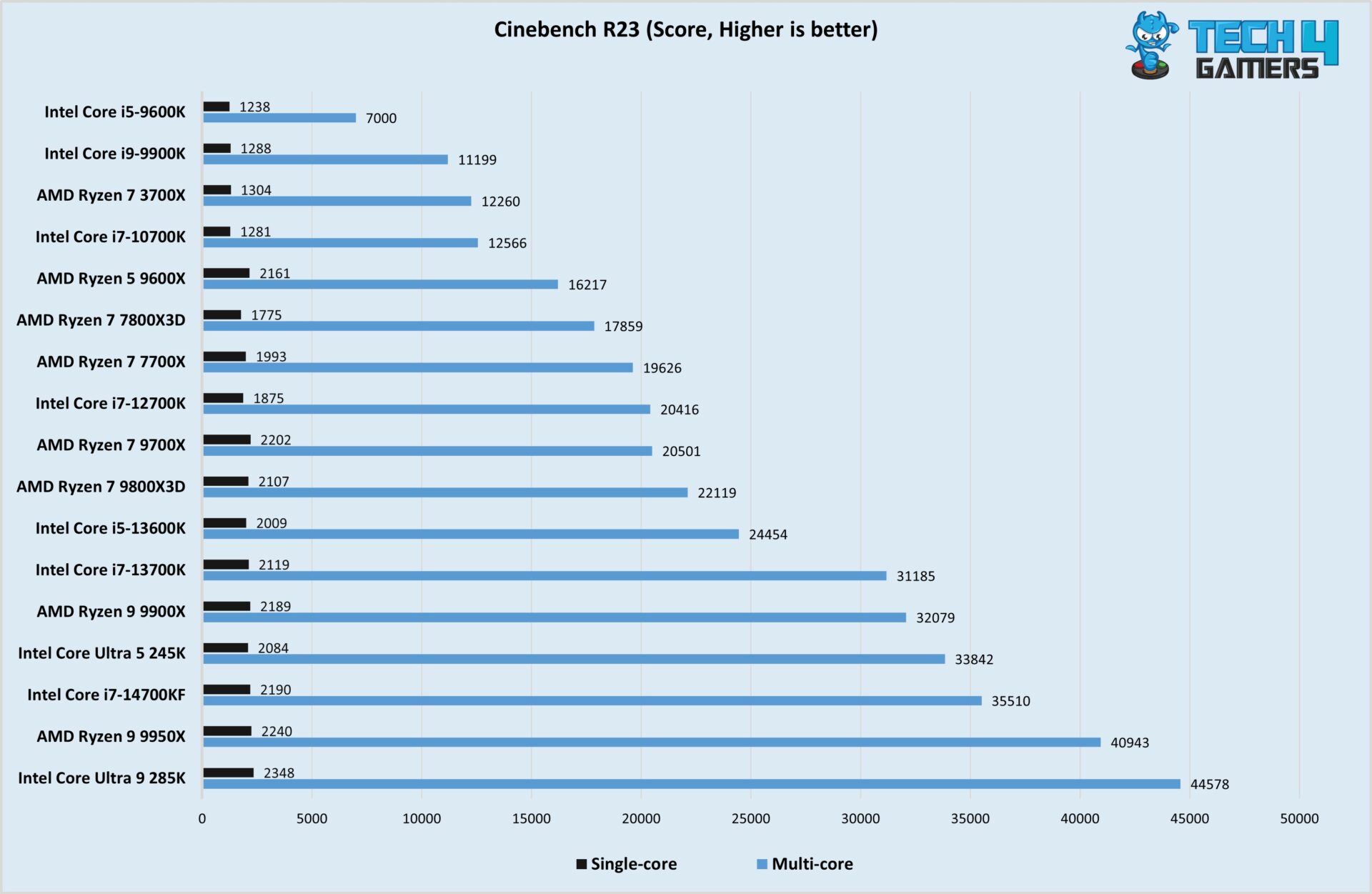
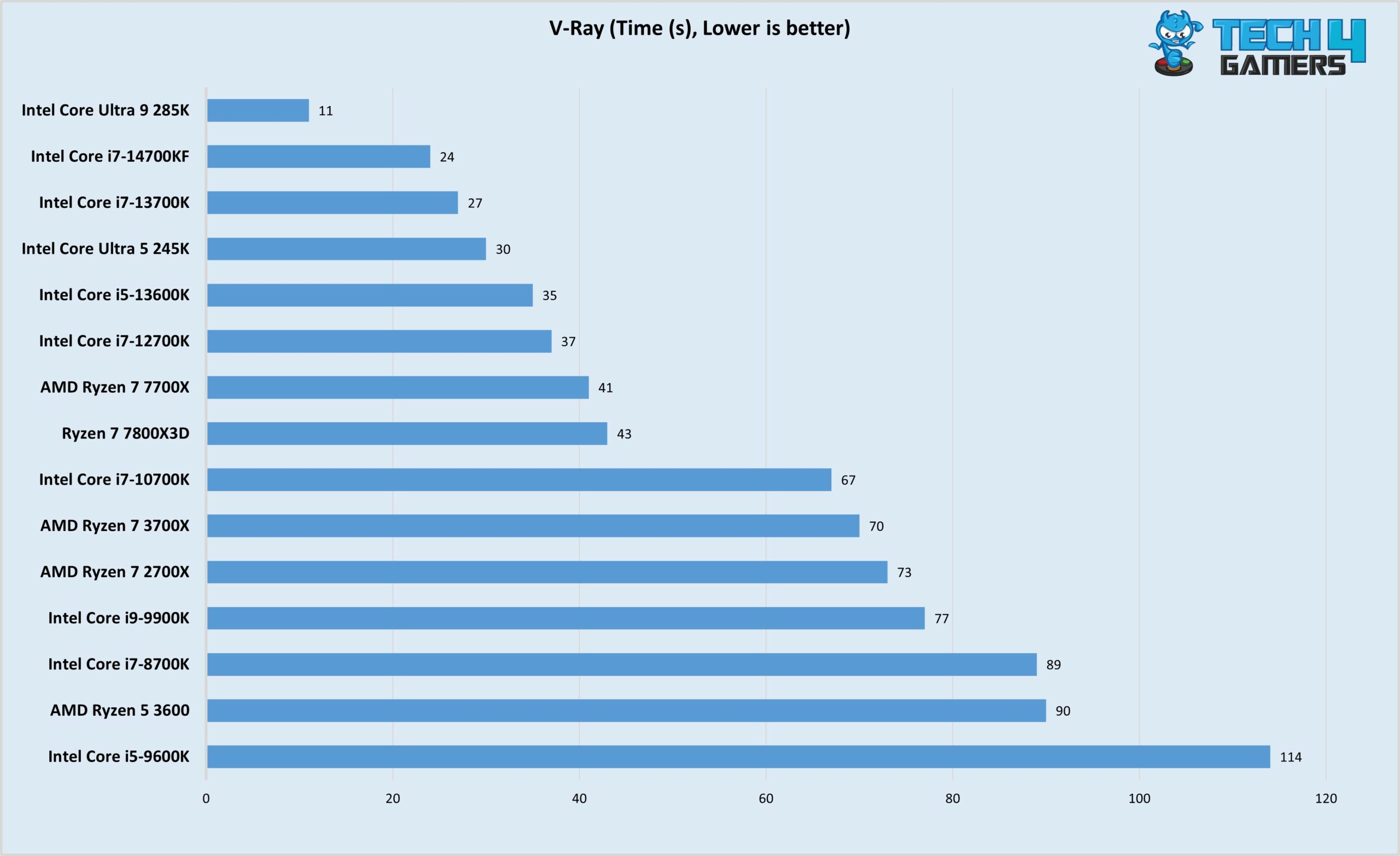
Best I5 CPU For Gaming 2026 Top 8 Models Tested Best I5 CPU For Gaming . 8 Best Gaming And Streaming CPU 2026 Reviews Performance Featured Image Zzsnrx91 . Best Budget CPUs In 2026 With Gaming Benchmarks Intel Core Ultra 5 245K Cinebench R23 Test Image By Tech4Gamers 1920x1251 . Best Budget CPUs In 2026 With Gaming Benchmarks Intel Core Ultra 5 245K V Ray Test Image By Tech4Gamers Scaled . Best Gaming Intel CPU 2026 8 Models Tested Compared Intel CPU

2026 CPU Upgrade Timing Cpu Upgrade Cycle 2026 How Long To Wait Banner V1.webp. Best Gaming CPU Intel 2026 Expert Reviews Performance Tests Featured Image Vzpzofjr . 12 Best CPU For Gaming March 2026 Processors Tested Ranked Featured Image Q3q6lajs . Best CPU For Gaming 2026 Top Gaming Processor The Best CPU For Gaming In 2026 01 . Best AMD Ryzen APU In 2026 Our Top Picks PC Guide Samsung TV Remote Codes Featured Image 29


Best CPU Intel For Gaming Tested And Ranked June 2026 Best CPU Intel For Gaming 1024x559 . Best Gaming I7 CPU 2026 Complete Buyer S Guide Featured Image Ybcoz8v8 . Best Gaming Intel CPU 2026 8 Models Tested Compared Featured Image T5c 8utg . Best AMD CPU For Gaming And Streaming 2026 Top 8 Zen 5 Processors Ranked Best AMD CPU For Gaming And Streaming 2026 . Best Processors For Gaming In 2026 For Every Budget Technoid Gaming PC Best Processors For Gaming In 2026 Top Picks For Every Gamer 7de5830b 3b61 4373 82b8


12 Best CPU For Gaming 2026 Tested And Ranked Featured Image 59d640hz . Best Gaming AMD CPU 2026 Expert Reviews Benchmark Tests Featured Image Riqw026n . 2026 CPU Launches AMD Intel NVIDIA Buy Now Or Wait YouTube . Best AM5 CPU For Gaming 2026 Expert Reviews Performance Tests Featured Image 4w457a1t . Best Gaming CPU 2026 Ryzen 7 9800X3D Vs 9600X Vs Intel Best Gaming Cpu 2026 768x432


Gaming CPU Buying Guide 2026 With Latest Pricing Trends NoobFeed Amd Launches 7500x3d Next Generation. CPU Vs GPU In 2026 Key Differences Use Cases And Tips Black Green Red Simple Modern Vlog YouTube Thumbnail 2. Dominate Azeroth Your 2026 CPU Guide Best Cpu For Wow 2026 The X3d Advantage Explained Banner.webp. Best Gaming CPU 2026 Gamers Unchained Best Gaming Cpu . Best Gaming Processor 2026 AMD Vs Intel Comparison Complete Guide Cpu Gaming Intel


8 Best Intel CPU For Gaming June 2026 Expert Reviews Best AMD Ryzen CPUs For Gaming 300x164 . CES 2026 Roundup All The Biggest Tech. Intel Vs AMD 2026 The Right CPU For Gaming Work 1536x1024 . The Best CPU For Gaming In 2026 Tom S Hardware . 12 Best CPU For Gaming 2026 Ultimate Performance Guide B0CGJ41C9W Customer 1 3 777x1024


Best Gaming CPU 2026 8 Processors Tested For Performance B09VCJ171S Customer 2 20 946x2048 . Best Intel CPU For Gaming 2026 Complete Performance Guide Best Intel CPU For Gaming . 10 Best CPU For 4K Gaming 2026 Expert Reviews Comparisons Featured Image 8sbo85f4 . Best PC Gaming CPU 2026 12 Processors Tested PC Gaming CPU 300x164 . How Important Is A CPU For Gaming Robots Net What Cpu Is Best For Gaming 1690342005